AI Overviews in Google Search: how they work and what my data shows
 Otso Karvinen · Co-founder of Parvi
On this page
AI Overviews are the AI-written summaries Google shows at the top of some search results, with links to the pages the answer is built from. Google started rolling them out to everyone in the US in May 2024, and they now show in Finland and Sweden too, in Finnish and Swedish.
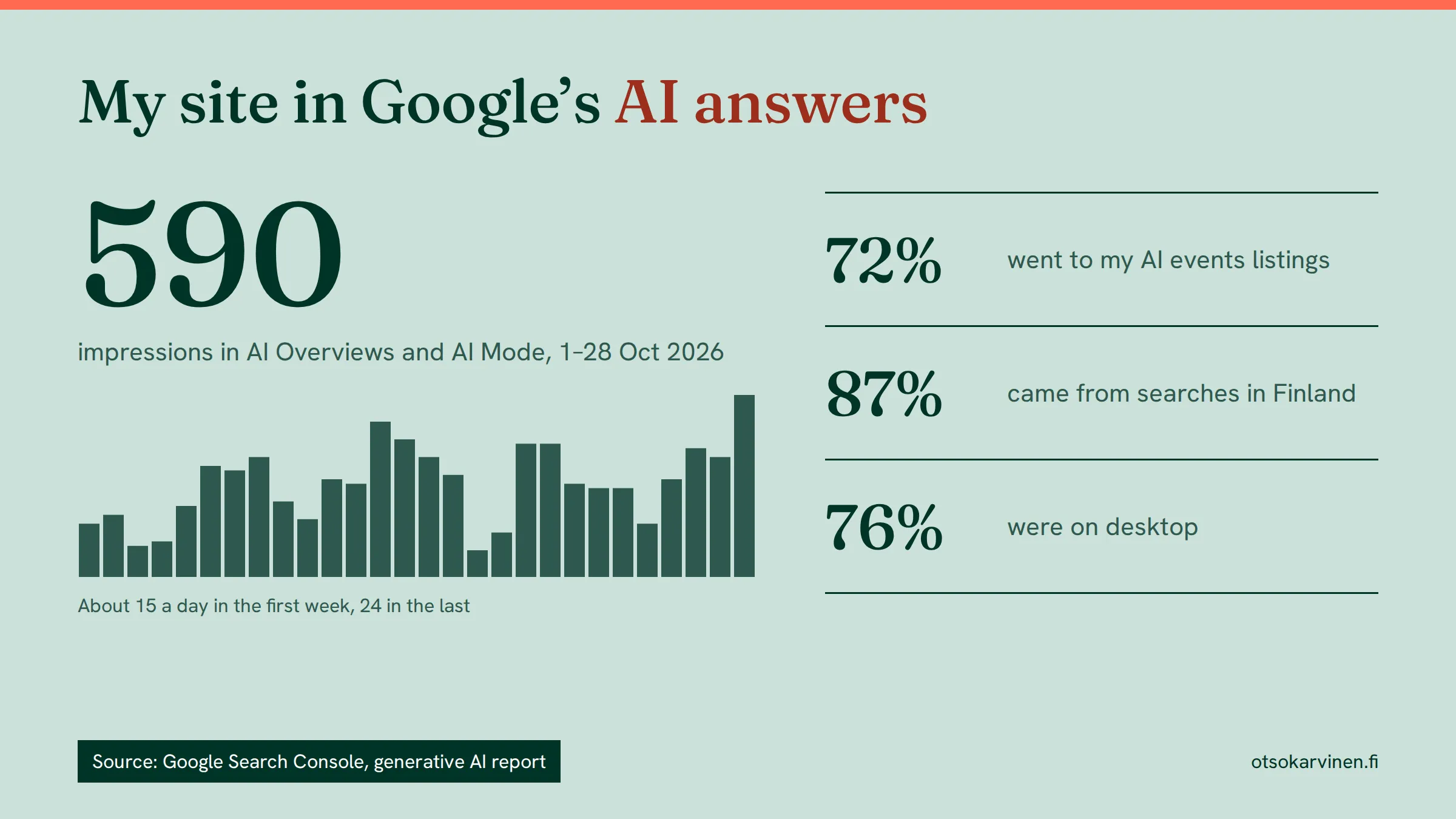
I track how often my own site shows up in them. From 1 to 28 October 2026 it was 590 times, and most of that went to one type of page. More on that below. If the whole idea of getting found in AI answers is new to you, start with what GEO is.
What are AI Overviews in Google Search?
An AI Overview is a short answer that Google’s AI writes for your search, with links to the websites it used. It sits above the normal results, so it’s often the first thing people read.
Google doesn’t show one on every search. Its documentation for site owners says they appear only when they add something to the classic results, “and as such, often don’t trigger”. How often that is keeps changing: in Semrush’s tracking of more than 10 million keywords, AI Overviews showed for about 6.5% of keywords in January 2025, close to 25% in July and 15.7% by November.
People also mix AI Overviews up with AI Mode, Google’s separate chat-style search. This is the difference in short:
| Compared | AI Overviews | AI Mode |
|---|---|---|
| Where | At the top of the normal results | Its own view, opened separately |
| When | Only on some searches | Whenever you open it |
| How you use it | You read it like a search result | You ask follow-up questions |
| Old name | SGE (Search Generative Experience) | None |
The two may also use different models, so the same question can get different answers and links in each.
How do AI Overviews pick their sources?
Google’s answer is short: a page has to be indexed and eligible to appear with a snippet (the short text under a search result) in normal Google Search, and there are no other technical requirements.
The answer itself is built with what Google calls a “query fan-out”. Instead of running only your search, the system runs several related searches on subtopics and writes the answer from what they find. So your page can be picked for a question that isn’t word for word what someone typed, as long as it answers one part of it well.
In practice, ranking still decides most of it. Ahrefs looked at the pages cited in AI Overviews and found that 76% of them also rank in the top 10 of the normal results for the same search. About 14% didn’t rank in the top 100 at all, which is where the fan-out shows: those pages were found through the related searches.
What does my own Search Console data show?
Google Search Console (Google’s free tool for site owners) has a generative AI report that counts how often your pages appear in AI Overviews and AI Mode. Since 31 August 2026 it has been open to all websites. This is what mine showed for 1 to 28 October 2026:
- 590 impressions in total. The daily count jumped around (from 6 to 41), but it grew: about 15 a day in the first week and about 24 a day in the last.
- 72% went to my AI events listings. 446 of the 618 page-level impressions landed on my pages that list upcoming AI events in Helsinki and elsewhere in Finland, in English and Finnish. The page list adds up to 618, not 590, so I only use it to work out the share.
- 87% came from Finland (514 impressions) and 76% from desktop (450).
- My long articles barely appeared. The best one, my page on marketing consulting in the age of agentic AI, had 30.
The pages Google used most answer a plain, factual question: which AI events are coming up in Helsinki. That’s one month on one small site, so I wouldn’t build a rule on it. But it fits what we keep finding in AI visibility analyses at Parvi: the most common gap is that a company’s site doesn’t plainly answer the basic questions its customers ask.
Keep in mind these are impressions, not clicks. The report shows how often you were in an AI answer, not whether anyone clicked through. I also export it by hand, because Google doesn’t offer it through its API (the data connection reporting tools use). I wrote more about combining it with other sources in how I track AI visibility.
Do AI Overviews take clicks away?
Yes, by the best numbers available. A Pew Research Center study followed what 900 US adults actually did on Google in March 2025. When an AI Overview appeared, people clicked a normal result on 8% of visits. Without one, they clicked on 15%. Links inside the AI Overview itself got a click on just 1% of visits.
Ahrefs measured the same thing from the other side: across 300,000 keywords, the top-ranking page got about 58% fewer clicks in December 2025 when an AI Overview sat above it. In its first run in April 2025 the gap was 34.5%, so it has grown.
So for a site owner, being cited in the AI Overview is now part of being found at all. My own 590 impressions didn’t turn into many visits, and that matches these studies. They tell me how visible a page is, not how much traffic it gets.
How do you get your site into AI Overviews?
There’s no switch to flip. These steps follow Google’s guidance plus the Ahrefs ranking data above:
- Check that Google can index the page and show a snippet. The URL Inspection tool in Search Console tells you. A
nosnippettag on the page keeps it out of AI Overviews. - Answer the basic questions in plain text. What you do, for whom, where, what it costs, how it works. Google lists “making sure that important content is available in textual form” as one of the basics. If the answer isn’t written on a page, Google’s AI can’t use it.
- Put the answer near the question. A heading phrased like the question, with the answer in the first sentence or two under it, makes the answer easy to find for readers and search engines alike.
- Rank in the normal results first. Three out of four cited pages already rank in the top 10, so ordinary SEO is still most of the work.
- Link to the page from your other pages. Google mentions internal links as a way to make content findable. My events listings are linked from the footer of every page on my site.
- Keep your business details up to date. Google mentions your Business Profile and Merchant Center information too, so the facts AI shows about you are current.
- Skip the shortcuts. Google’s documentation is explicit that you don’t need AI text files, new machine-readable files or special markup to appear. If you use structured data, make sure it matches what’s visible on the page.
Getting into Google’s AI answers is only part of the picture, though. ChatGPT, Claude and Perplexity each work differently, and you can see how they answer for your company with my free AI visibility check.
Can you turn off AI Overviews?
As a searcher, no. Google’s help page says AI Overviews are a core Search feature, like knowledge panels, and can’t be turned off. You can pick the Web filter after you search, which shows plain text links without them.
As a site owner you have some control, but it costs you. The nosnippet, data-nosnippet and max-snippet settings limit what Google may show from your page, in AI features and in normal results alike, and noindex removes the page from Search completely. Blocking Google-Extended won’t do it either, because that setting covers AI training in Google’s other systems, not Search. For most companies I’d keep the snippets on.
Why isn’t an AI Overview showing up?
Usually because Google decided it wouldn’t help for that search, as above. They also only show in the countries and languages where Google has launched them; the list is on Google’s help page.
If your own pages never appear, look at the basics first: is the page indexed, does it answer a question someone actually searches, and does it rank in the normal results for anything close to that question.
How do you see if your site appears in AI Overviews?
Open Search Console and look for the generative AI report. It shows impressions, the pages that appeared, countries, devices and dates. Clicks from AI Overviews are counted in the normal Performance report together with all other Google traffic, so you can’t separate them there.
I wrote about measuring how your social media posts do in Google in how to measure social media SEO.
If you’d rather have someone check where you stand, Parvi does this as a GEO audit, and when the basics are the problem, an SEO audit is the better start.
FAQ
How do I turn off Google AI Overviews?
You can't switch them off as a searcher. Google says AI Overviews are a core part of Search, like knowledge panels. What you can do is pick the Web filter under the search box after you search, which shows plain text links without the AI Overview.
What is Google SGE?
SGE stands for Search Generative Experience. It was the name of Google's AI answers while they were an experiment in Search Labs. In May 2024 Google started rolling them out to everyone in the US under the name AI Overviews, and SGE is now an old name for the same feature.
How do I use AI Mode in Google Search?
AI Mode is a separate AI search view in Google where you ask a question and can keep asking follow-ups. Google says it splits your question into subtopics and searches each one at the same time. Where it's available, you open it at google.com/ai, or type a question in Google and tap AI Mode.
Why isn't the Google AI Overview showing up?
Most often because Google decided it wouldn't add anything for that search. Google's own documentation says AI Overviews only show when they add something to the normal results and often don't trigger. They are also limited to the countries and languages where Google has launched them.
How do I get my website into Google AI Overviews?
According to Google there are no extra requirements. The page has to be indexed and eligible to show with a snippet in normal Google Search, and the usual SEO basics apply. In my own data the pages that showed up most were the ones that answer a plain, factual question.

Written byOtso Karvinen
I design and build agentic AI systems for marketing and sales teams. Co-founder of Parvi.